

Scaling
Architecture Overview
Sockudo uses a pluggable adapter system for horizontal scaling. All horizontal adapters share the same HorizontalAdapterBase<T> core with a transport-specific backend.
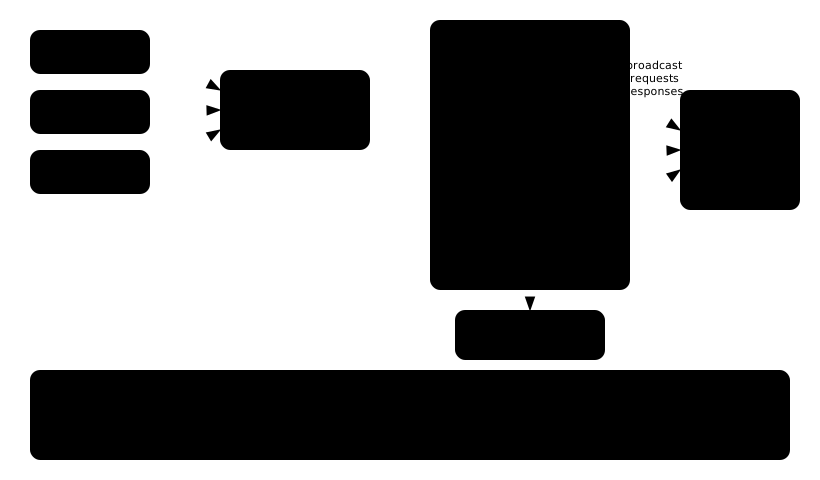
Each node maintains local WebSocket connections and uses the adapter to synchronize state across the cluster.
Adapter Drivers
| Driver | Use Case | Requirements |
|---|---|---|
local | Single-node, development | None |
redis | Multi-node with standalone Redis | Redis 6+ |
redis-cluster | Multi-node with Redis Cluster | Redis Cluster 6+ (7.0+ for sharded pub/sub) |
nats | Multi-node with NATS | NATS server |
Set the adapter via config or env:
ADAPTER_DRIVER=redis
{ "adapter": { "driver": "redis" } }
Communication Model
All horizontal adapters communicate over three channels:
| Channel | Purpose |
|---|---|
Broadcast (prefix:#broadcast) | Distribute events to subscribers across nodes |
Request (prefix:#requests) | Node-to-node queries (socket counts, presence members, etc.) |
Response (prefix:#responses) | Return aggregated responses to requests |
Broadcasting Flow
- Node receives an event (from a client or the HTTP API).
- Delivers to matching local subscribers immediately.
- Serializes and publishes to the broadcast channel.
- Other nodes receive the message, apply filtering (socket exclusion, tag filtering, delta compression), and deliver to their local subscribers.
Request/Response Pattern
Cross-node queries use a request/response pattern with correlation IDs and timeouts:
- Fast queries (socket existence, channel membership): 50ms timeout per expected node.
- Full queries (presence members, channel lists): full configured timeout.
- Early return: positive results (e.g., "socket exists") return immediately without waiting for all nodes.
Supported request types include:
- Socket counts and channel lists
- Channel membership and presence member queries
- User connection counts
- Presence state sync (join/leave replication)
- Heartbeat and dead node notifications
- Terminate user connections
Local Adapter
The default adapter. All communication stays in-process with no network overhead.
{ "adapter": { "driver": "local" } }
Best for:
- Development and testing
- Single-node deployments
- Environments where horizontal scaling is not needed
Redis Adapter
Uses Redis Pub/Sub for cross-node communication.
{
  "adapter": {
    "driver": "redis",
    "redis": {
      "requests_timeout": 5000,
      "prefix": "sockudo_adapter:",
      "cluster_mode": false
    }
  }
}
Configuration
| Field | Type | Default | Description |
|---|---|---|---|
requests_timeout | number | 5000 | Request timeout in ms |
prefix | string | sockudo_adapter: | Redis key/channel prefix |
redis_pub_options | object | {} | Additional options for the publish connection |
redis_sub_options | object | {} | Additional options for the subscribe connection |
cluster_mode | bool | false | Use cluster-aware connections |
Connection Management
- Uses
ConnectionManagerfor automatic reconnection (5 retries with exponential backoff). - Maintains a separate connection for the Events API to avoid blocking pub/sub.
- Node counting via
PUBSUB NUMSUB. - Publish retries: 3 attempts with exponential backoff (100ms to 1000ms).
Redis Database Connection
The Redis adapter uses the connection configured in database.redis. You can override it globally with REDIS_URL:
REDIS_URL=redis://:password@redis.example.com:6379/0
This overrides adapter, cache, queue, and rate limiter Redis connections in one shot.
Redis Cluster Adapter
Uses Redis Cluster for sharded, multi-node pub/sub.
{
  "adapter": {
    "driver": "redis-cluster",
    "cluster": {
      "nodes": [
        "redis://10.0.0.11:7000",
        "redis://10.0.0.12:7001",
        "redis://10.0.0.13:7002"
      ],
      "prefix": "sockudo_adapter:",
      "request_timeout_ms": 1000,
      "use_connection_manager": true,
      "use_sharded_pubsub": false
    }
  }
}
Configuration
| Field | Type | Default | Description |
|---|---|---|---|
nodes | string[] | [] | Cluster seed node URLs |
prefix | string | sockudo_adapter: | Key/channel prefix |
request_timeout_ms | number | 1000 | Request timeout in ms |
use_connection_manager | bool | true | Use persistent connection manager |
use_sharded_pubsub | bool | false | Use SSUBSCRIBE/SPUBLISH (Redis 7.0+) |
Sharded Pub/Sub
When use_sharded_pubsub is enabled, the adapter uses Redis 7.0+ sharded pub/sub commands (SSUBSCRIBE/SPUBLISH). This routes messages to the specific shard that owns the channel's hash slot instead of broadcasting to all nodes.
Benefits:
- Significantly better performance in large clusters.
- Reduced network traffic (messages go only to relevant shards).
- Eliminates pub/sub hotspots on single nodes.
{
  "adapter": {
    "driver": "redis-cluster",
    "cluster": {
      "use_sharded_pubsub": true
    }
  }
}
Connection Strategy
- Persistent publish connection: cloned per operation (cheap, thread-safe).
- Dedicated health check connection: prevents timeouts under high load (10K+ msg/s).
- Reconnection with exponential backoff (500ms to 10s max).
Cluster Node Configuration
Provide seed nodes via config or env:
REDIS_CLUSTER_NODES=redis://10.0.0.11:7000,redis://10.0.0.12:7001
# or
DATABASE_REDIS_CLUSTER_NODES=redis://10.0.0.11:7000,redis://10.0.0.12:7001
Cluster auth and TLS are configured under database.redis.cluster:
{
  "database": {
    "redis": {
      "cluster": {
        "nodes": [
          { "host": "node1.example.com", "port": 7000 },
          { "host": "node2.example.com", "port": 7001 }
        ],
        "username": "cluster-user",
        "password": "cluster-secret",
        "use_tls": true
      }
    }
  }
}
NATS Adapter
Uses NATS subjects for cross-node messaging.
{
  "adapter": {
    "driver": "nats",
    "nats": {
      "servers": ["nats://localhost:4222"],
      "prefix": "sockudo_adapter:",
      "request_timeout_ms": 5000,
      "connection_timeout_ms": 5000
    }
  }
}
Configuration
| Field | Type | Default | Description |
|---|---|---|---|
servers | string[] | ["nats://localhost:4222"] | NATS server URLs |
prefix | string | sockudo_adapter: | Subject prefix |
request_timeout_ms | number | 5000 | Request timeout in ms |
username | string? | null | NATS username |
password | string? | null | NATS password |
token | string? | null | NATS auth token |
connection_timeout_ms | number | 5000 | Connection timeout in ms |
nodes_number | number? | null | Expected cluster node count (manual) |
Authentication
NATS supports username/password or token auth:
NATS_SERVERS=nats://nats1:4222,nats://nats2:4222
NATS_USERNAME=sockudo
NATS_PASSWORD=secret
# or
NATS_TOKEN=my-auth-token
Node Counting
NATS does not support automatic subscriber counting like Redis. If you need accurate node counts (for request timeout calculation), set nodes_number manually:
{
  "adapter": {
    "nats": {
      "nodes_number": 3
    }
  }
}
Presence Synchronization
Horizontal adapters maintain a cluster-wide presence registry for presence channels. Each node tracks presence data from all other nodes.
How It Works
- Join: When a user joins a presence channel, the node broadcasts a
PresenceMemberJoinedmessage to all nodes. - Leave: On disconnect or channel leave,
PresenceMemberLeftis broadcast. - New node detection: When a heartbeat is received from a previously unknown node, existing nodes send a
PresenceStateSyncwith their full presence data. - Conflict resolution: Each presence operation carries a sequence number. Higher sequence numbers win during concurrent updates.
Data Structure
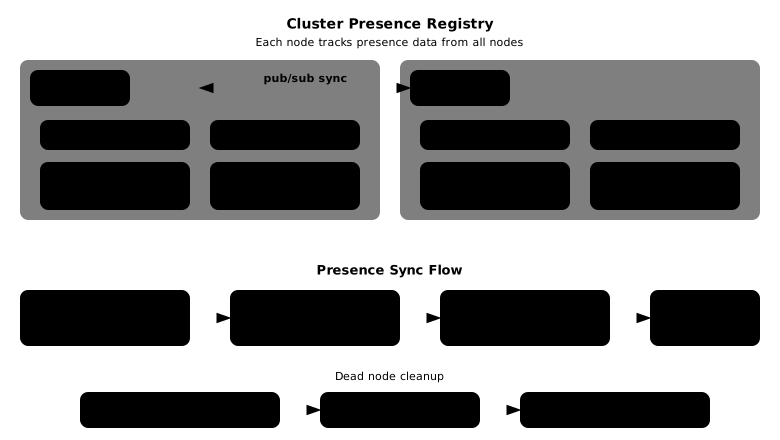
When a node dies, the cluster health system detects it and cleans up all its presence entries in O(1) (removal of entire node key).
Cluster Health
Cluster health monitoring detects dead nodes and cleans up their state. It is enabled by default when using a horizontal adapter.
How It Works
- Heartbeat: Each node periodically broadcasts a heartbeat with its timestamp.
- Dead node detection: A periodic task checks for nodes whose last heartbeat exceeds the timeout.
- Leader election: The node with the lowest
node_idbecomes the cleanup leader. - Cleanup (leader only): The leader removes the dead node's presence data and broadcasts a
NodeDeadmessage. Follower nodes clean their local registries upon receiving this message.
Configuration
{
  "cluster_health": {
    "enabled": true,
    "heartbeat_interval_ms": 10000,
    "node_timeout_ms": 30000,
    "cleanup_interval_ms": 10000
  }
}
| Field | Default | Description |
|---|---|---|
enabled | true | Enable cluster health monitoring |
heartbeat_interval_ms | 10000 | Heartbeat broadcast interval |
node_timeout_ms | 30000 | Node considered dead after this |
cleanup_interval_ms | 10000 | How often to check for dead nodes |
heartbeat_interval_ms must be at most node_timeout_ms / 3 to avoid false positive dead node detection.Environment Variables
CLUSTER_HEALTH_ENABLED=true
CLUSTER_HEALTH_HEARTBEAT_INTERVAL=10000
CLUSTER_HEALTH_NODE_TIMEOUT=30000
CLUSTER_HEALTH_CLEANUP_INTERVAL=10000
Adapter-Level Settings
These settings apply to all horizontal adapters.
| Setting | Env Var | Default | Description |
|---|---|---|---|
| Buffer multiplier | ADAPTER_BUFFER_MULTIPLIER_PER_CPU | 64 | Concurrent operations per CPU core |
| Socket counting | ADAPTER_ENABLE_SOCKET_COUNTING | true | Track socket counts across cluster |
Socket counting aggregates connection counts across all nodes. Disable it if you don't need cluster-wide counts and want to reduce cross-node requests:
ADAPTER_ENABLE_SOCKET_COUNTING=false
Performance Optimizations
The horizontal adapter layer includes several automatic optimizations:
- Single-node detection: When only one node is detected (via cluster health), cross-node requests are skipped entirely.
- Delta compression: Pre-computes deltas at the broadcast level and reuses them for all local sockets, avoiding redundant computation.
- Concurrency control: A broadcast semaphore limits parallel socket sends to prevent overwhelming the event loop. Sockets are processed in adaptive chunks (1-8 based on socket count).
- Connection reuse: All adapters use persistent connections with cheap cloning for concurrent operations.
- Adaptive timeouts: Fast queries (existence checks) use short timeouts, while full queries (member lists) use the configured timeout.
Adapter Comparison
| Feature | Local | Redis | Redis Cluster | NATS |
|---|---|---|---|---|
| Horizontal scaling | No | Yes | Yes | Yes |
| Auto-reconnection | N/A | Automatic (5 retries) | Manual with backoff | Built-in (NATS lib) |
| Node counting | 1 | PUBSUB NUMSUB | PUBSUB NUMSUB | Manual (nodes_number) |
| Sharded pub/sub | N/A | No | Yes (Redis 7.0+) | N/A |
| TLS support | N/A | Via REDIS_URL | Via use_tls | Via NATS URL scheme |
| Auth | N/A | Password/ACL | Password/ACL | User/pass or token |
| Health check | N/A | PING | PING | Connection state |
Cache / Queue / Rate Limiter
These backends are configured independently from the adapter:
| Backend | Drivers | Purpose |
|---|---|---|
| Cache | memory, redis, redis-cluster, none | App manager caching, channel state |
| Queue | memory, redis, redis-cluster, sqs, none | Webhook delivery |
| Rate limiter | memory, redis, redis-cluster, none | API and WebSocket rate limiting |
Use shared Redis-based backends when you need cluster-wide consistency (e.g., rate limiting across all nodes).
Build Features
Compile only the adapters you need for smaller binaries:
# Local only (default)
cargo build

# Redis adapter
cargo build --features redis

# Redis Cluster adapter
cargo build --features redis-cluster

# NATS adapter
cargo build --features nats

# Multiple backends
cargo build --features "redis,nats,postgres"

# Everything
cargo build --release --features full
Typical Production Configurations
Redis (most common)
{
  "adapter": { "driver": "redis" },
  "cache": { "driver": "redis" },
  "queue": { "driver": "redis" },
  "rate_limiter": { "driver": "redis", "enabled": true }
}
Redis Cluster (large scale)
{
  "adapter": {
    "driver": "redis-cluster",
    "cluster": {
      "use_sharded_pubsub": true
    }
  },
  "cache": { "driver": "redis-cluster" },
  "queue": { "driver": "redis-cluster" }
}
NATS
{
  "adapter": {
    "driver": "nats",
    "nats": {
      "servers": ["nats://nats1:4222", "nats://nats2:4222"],
      "nodes_number": 3
    }
  }
}