
Sockudo Documentation
Build, operate, and extend Sockudo: the Rust realtime server with Pusher compatibility, Protocol V2, clustered fanout, recovery, history, push, and official SDKs.
Sockudo is a self-hosted realtime platform for teams that want Pusher-compatible APIs with deeper control over protocol evolution, horizontal scaling, history, recovery, observability, and SDK behavior.
Ship Pusher-compatible realtime now. Add durability when you need it.
Sockudo keeps the Pusher-shaped WebSocket and HTTP API surface familiar while giving teams a native Protocol V2 path for recovery, history, mutable messages, annotations, push workflows, and horizontal fanout.
Start the production pathKeep existing clients moving. Protocol V1 preserves pusher-js, Laravel Echo, Pusher auth, and familiar server publish flows.
Add native capabilities deliberately. Protocol V2 adds serials, message IDs, rewind, deltas, tags, annotations, mutable messages, and recovery metadata without leaking into V1 delivery.
Operate it like infrastructure. Server docs cover adapters, app managers, queues, caches, metrics, rate limits, webhooks, push, and cluster failure paths.
- Drop-in surface
- Protocol V1
- Native layer
- Protocol V2
- Runtime
- Rust + Tokio
- Operations
- Cluster ready
Install and verify
Run Sockudo locally, choose features, inspect health probes, and understand the default development app.
Connect the first loop
Subscribe from a client, publish from a trusted backend, add idempotency, and confirm metrics move.
Migrate from Pusher
Map pusher-js, Laravel Echo, Channels auth, event names, and publish calls onto Sockudo.
Design Protocol V2 streams
Use message IDs, serial continuity, rewind, deltas, tag filters, annotations, and recovery.
Deploy to production
Choose a topology, configure files and secrets, tune hosts, and deploy on VMs, containers, Kubernetes, or cloud platforms.
Reference the API
Find every server endpoint for publishing, channel state, history, mutations, annotations, push, and operations.
Production topology
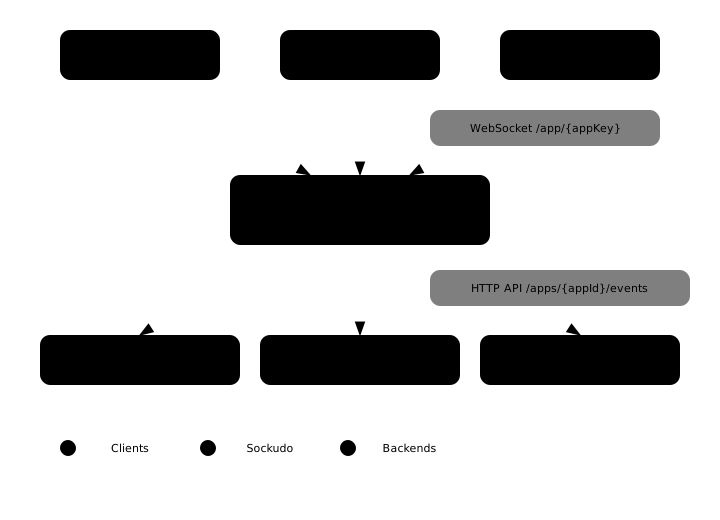
Sockudo sits between realtime clients and trusted backends. Clients hold WebSocket connections and subscribe to public, private, presence, or encrypted channels. Backends use the HTTP API or server SDKs to publish events, sign channel auth, mutate V2 messages, manage push devices, and inspect operational state.
One protocol edge, multiple durability choices.
Start with the in-memory local profile, then move app records, caches, queues, adapters, history, and push status into production backends as the deployment grows.
- WebSocket ingress: client connect, subscribe, auth, presence, and realtime delivery.
- HTTP control plane: trusted publishes, channel state, history reads, message mutations, annotations, and push workflows.
- Horizontal fanout: Redis, NATS, Kafka, RabbitMQ, Pulsar, Google Pub/Sub, Iggy, or another configured adapter.
Recommended path
- Run a local Sockudo server from Installation.
- Publish and receive your first event from First connection.
- Add private and presence channel auth from Authentication.
- Choose Protocol V1 or V2 from Compatibility.
- Wire your client from Realtime Clients and your backend from Server SDKs.
- Follow the Deployment guide, then harden the runtime with Scaling, Security, and Observability.
Developer quick loops
The examples use the default development app. Keep these values local only:
export SOCKUDO_APP_ID=app-id
export SOCKUDO_APP_KEY=app-key
export SOCKUDO_APP_SECRET=app-secret
export SOCKUDO_HOST=127.0.0.1
export SOCKUDO_PORT=6001
Run Sockudo and check health
docker compose up sockudo redis
curl -f http://127.0.0.1:6001/up
curl -f http://127.0.0.1:9601/metrics | head
Use Docker Compose when you want Redis and repeatable local dependencies. Use cargo run --release when you want to validate a source build or a specific feature set.
Subscribe from a client
import Sockudo from "@sockudo/client";

const client = new Sockudo("app-key", {
  wsHost: "127.0.0.1",
  wsPort: 6001,
  forceTLS: false,
  enabledTransports: ["ws"],
  protocolVersion: 2,
});

client.subscribe("orders").bind("order.created", (payload) => {
  console.log("received", payload);
});
Set protocolVersion: 2 when the client needs Sockudo-native recovery, rewind, message IDs, tags, deltas, annotations, or mutable messages. Leave existing Pusher-compatible clients on Protocol V1 until you are ready to adopt V2 behavior.
Publish from a trusted backend
import { Sockudo } from "sockudo";

const sockudo = new Sockudo({
  appId: "app-id",
  key: "app-key",
  secret: "app-secret",
  host: "127.0.0.1",
  port: 6001,
  useTLS: false,
});

await sockudo.trigger(
  "orders",
  "order.created",
  { id: "ord_123", total: 4200 },
  { idempotency_key: "order-created-ord_123" },
);
Server SDKs sign requests, format payloads, and hide HMAC details. Use raw HTTP only when you are implementing or debugging an SDK.
Turn local config into a production shape
port = 6001
host = "0.0.0.0"
debug = false

[app_manager]
driver = "postgres"

[adapter]
driver = "redis"

[cache]
driver = "redis"

[queue]
driver = "redis"

[metrics]
enabled = true
port = 9601
The important move is not a single backend choice. It is separating connection fanout, app records, cache state, queue work, durable history, push status, and metrics so each subsystem can fail, scale, and be observed independently.
Local baseline
The examples use the default development app:
port = 6001
host = "0.0.0.0"

[app_manager]
driver = "memory"

[[app_manager.array.apps]]
id = "app-id"
key = "app-key"
secret = "app-secret"
enabled = true
For production, replace every example credential, enable TLS at the edge, use managed app storage, and keep app secrets only on trusted servers.
Production readiness checklist
- Compatibility: decide which clients stay on Protocol V1 and which channels may use Protocol V2 features.
- Authentication: keep app secrets server-side, sign private and presence auth responses, and reject stale HTTP signatures.
- Fanout: choose an adapter, configure sticky sessions when required, and test cross-node broadcast delivery before launch.
- Durability: enable history, recovery, version storage, annotations, and push status only for channels that need those contracts.
- Idempotency: attach stable keys to retried publishes, message mutations, push requests, and backend workflows.
- Observability: scrape
/metrics, alert on connection churn, publish failures, adapter errors, webhook retries, push provider outcomes, and recovery failures. - Operations: document feature flags, runtime config, secret rotation, rollout order, and rollback behavior for every backend dependency.