
Scaling
Design multi-node Sockudo deployments with shared adapters, cache, queues, recovery, and push fanout.
Sockudo scales horizontally when every node shares the dependencies that carry cross-node state: adapter, cache, queue, app manager, and optional history store.
AI Transport has a stricter horizontal matrix because streaming recovery depends on durable history, versioned-message state, and shared orphan ownership. For horizontal adapters (redis, redis-cluster, nats, pulsar, rabbitmq, google-pubsub, kafka, or iggy), configure shared non-memory history and version-store backends plus Redis or Redis Cluster cache. Startup rejects AI Transport with process-local memory history, version stores, or cache on horizontal adapters.
Architecture
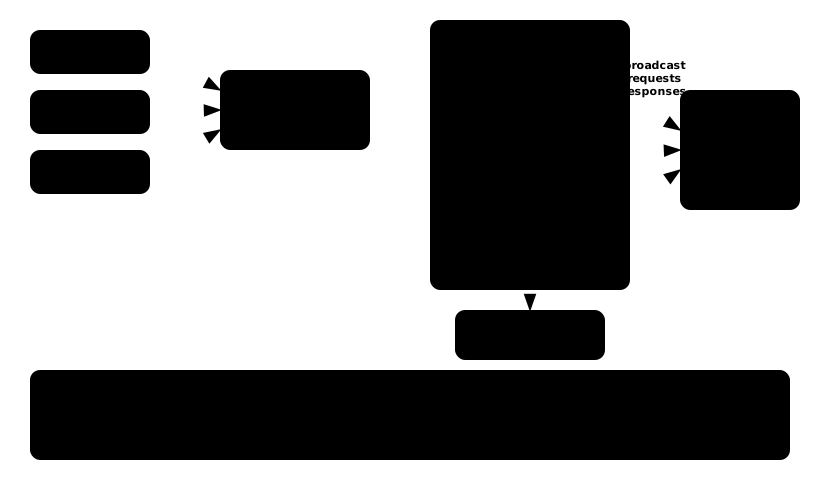
At minimum, a production cluster has:
- a load balancer with WebSocket upgrade support
- multiple Sockudo nodes
- a shared adapter for cross-node fanout
- shared cache for rate limits, idempotency, and coordination
- shared queue for webhooks and push delivery
- shared app manager for dynamic app credentials
- metrics and logs from every node
Adapter choices
| Adapter | Strength |
|---|---|
| Redis | Simple, common, low-latency local and regional deployments. |
| Redis Cluster | Higher Redis scale and shard-aware deployments. |
| NATS | Lightweight pub/sub with strong operational ergonomics. |
| Kafka | Durable stream backbone and high-volume integration pipelines. |
| RabbitMQ | Enterprise messaging and routing patterns. |
| Pulsar | Multi-tenant stream workloads. |
| Google Pub/Sub | Managed GCP fanout. |
| Apache Iggy | High-throughput persistent log workloads. |
NATS notes
NATS is a good fit for lightweight cross-node fanout, but Sockudo clusters should avoid turning every client subscribe or unsubscribe into a distributed request/reply round trip. Keep room-switch churn on local channel state where possible, and reserve cluster-wide socket counts for post-ack meta events, webhooks, HTTP inspection, and operator views.
For subscription-churn or room-switch benchmarks, prefer gossiped aggregate counts so count reads stay local on each node:
ADAPTER_ENABLE_SOCKET_COUNTING=false
ADAPTER_AGGREGATE_COUNTS=true
Presence first-join and last-leave checks remain strict by default because they drive member webhooks and presence history. For workloads that prefer maximum churn throughput over immediate transition consistency, opt into the replicated presence-registry fast path:
ADAPTER_FAST_PRESENCE_TRANSITIONS=trueFor Kubernetes NATS clusters, prefer explicit StatefulSet pod DNS entries over a single headless service URL when you want better initial client spread:
{
  "adapter": {
    "driver": "nats",
    "nats": {
      "servers": [
        "nats://sockudo-nats-0.sockudo-nats-headless:4222",
        "nats://sockudo-nats-1.sockudo-nats-headless:4222",
        "nats://sockudo-nats-2.sockudo-nats-headless:4222"
      ],
      "request_timeout_ms": 5000,
      "connection_timeout_ms": 5000,
      "subscription_capacity": 131072,
      "client_capacity": 131072,
      "max_reconnects": 60,
      "no_echo": true
    }
  }
}
If nodes_number is set, it means expected Sockudo nodes, not NATS server replicas. Use it only when the Sockudo replica count is fixed or injected from deployment automation; otherwise leave discovery enabled.
Load balancing
Sockudo does not require sticky sessions for basic pub/sub when the adapter is shared. Sticky sessions can still reduce reconnect churn and preserve local buffers during rolling updates.
Use:
- WebSocket upgrade headers
- idle timeouts longer than heartbeat intervals
- health and readiness checks
- draining before pod termination
- disruption budgets for production clusters
For Kubernetes probes, use /live for liveness and startup probes. /up checks configured apps and shared dependencies, so it is appropriate for readiness but too expensive for liveness under backend pressure. A slow app manager, cache, queue, or adapter should make the pod unready, not restart it.
livenessProbe:
  httpGet:
    path: /live
    port: http
startupProbe:
  httpGet:
    path: /live
    port: http
readinessProbe:
  httpGet:
    path: /up/<app-id>
    port: http
Duplicate delivery
Distributed realtime systems must tolerate retries and duplicate delivery. Sockudo features that help:
- HTTP
idempotency_key - V2
message_id - client-side message deduplication in native SDKs
- adapter-level duplicate suppression visibility
- recovery continuity checks
Consumers should treat application event IDs as stable and idempotent.
Recovery across nodes
V2 recovery uses stream continuity. A reconnect to a different node can recover only if the required replay state is available through the configured shared backend or still present in a valid buffer.
Fail closed if continuity cannot be proven. Do not display a recovered state unless the server returns a successful resume.
Push fanout at scale
Push notification fanout is queue-oriented. A realtime publish and a push publish may target the same logical event, but they have different latency, retry, and delivery semantics.
Operational recommendations:
- keep push
syncfalse in production - use idempotency keys for publish retries
- partition high-volume channel pushes by tenant or campaign
- set publish status retention high enough for support workflows
- alert on provider error rates and queue backlog
- store provider credentials in secrets, not config maps
- use capacity planning before large campaigns
Rolling deploys
- Mark the node unready.
- Stop accepting new connections.
- Let existing connections drain or close with a reconnect-friendly code.
- Keep adapter and cache dependencies available.
- Watch reconnect, resume, and missed-message metrics.
- Roll nodes in small batches.
Metrics to watch
- active connections by node
- subscription count by channel class
- publish accepted and failed counters
- fanout latency and adapter errors
- recovery success and failure counters
- replay buffer pressure
- AI stream orphan cancellations and
ai_stream_orphanedwebhook delivery - webhook queue depth and failure count
- push publish accepted, dispatched, failed, and scheduled counters
- push provider latency and error labels
Capacity checklist
Before increasing traffic, follow Capacity planning and benchmarks and run a scenario that covers:
- peak connected clients
- high-frequency channel fanout
- private and presence auth throughput
- durable history writes
- recovery after node restart
- AI stream orphan closure after node death
- pause/unpause partition checks with
scripts/ai-transport-jepsen-lite.sh - push burst admission
- push provider throttling
- webhook retry behavior
For room-switch workloads, benches/subscription-churn.js models connected sockets that periodically unsubscribe and subscribe to a new room. Churn rate is approximately VUS / (ROOM_SWITCH_INTERVAL_MS / 1000). For example, 10,000 users switching every 20 seconds produces about 500 unsubscribe+subscribe cycles per second:
k6 run \
  -e WS_HOSTS=wss://example.com/app/app-key \
  -e VUS=10000 \
  -e CHANNEL_COUNT=4000 \
  -e ROOM_SWITCH_INTERVAL_MS=20000 \
  -e SOCKET_LIFETIME_MS=600000 \
  -e DURATION=10m \
  benches/subscription-churn.js